
Dutch
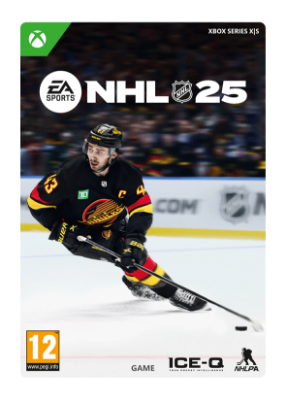
EA SPORTS™ NHL 25

Purchase EA SPORTS™ NHL® 25 Standard Edition and receive:
- 250 NHL Points
Koop EA SPORTS™ NHL 25 Standard Edition en ontvang:
- 250 NHL Points
EA SPORTS™ NHL 25 wordt aangestuurd door ICE-Q, een nieuw systeem voor gameplay-intelligentie dat je de tijd en ruimte geeft om elke centimeter van het ijs te domineren. Met Next-Gen Vision Control kun je langs de blauwe lijn bewegen, gefocust blijven op het doel en nog veel meer. De verbeterde AI vernieuwt het systeem voor CPU-spelers van Chel volledig, waardoor ze authentieke acties kunnen uitvoeren met een verfrist playbook dat powerplays verbetert en het ijs opent voor betere algehele positionering en aanvalskansen. Reactive Actions maakt gebruik van een reeks nieuwe animaties om schaatsers responsiever te maken in cruciale situaties, waardoor het gevoel van urgentie, de botsingspreventie en de betrouwbaarheid worden verbeterd. ICE-Q is echte ijshockeyintelligentie.
Bovendien tillen een vernieuwde Franchise Mode-ervaring, een gloednieuwe WOC Live Events-structuur, de HUT Wildcard Mode en één in HUT gedeeld vereenvoudigd XP-voortgangspad de game modes van Chel naar een hoger niveau. Om de presentatie nog verder te verbeteren, houdt het gloednieuwe Grudge Match System de competitieve geschiedenis tussen teams bij in alle belangrijke online en offline modes en verbetert het series met speciale X-Factors die worden verdiend in eerdere wedstrijden tegen rivaliserende teams. Tot slot tilt de introductie van Sapien Technology in de franchise de gelijkenis van personages naar een geheel nieuw niveau. Net als de Hughes Brothers staat NHL 25 voor hockey van de volgende generatie.
Dit spel bevat optionele in-game aankopen van virtuele valuta waarmee je virtuele in-game items kunt kopen, inclusief een willekeurige selectie virtuele in-game items.
- 250 NHL Points
EA SPORTS™ NHL 25 wordt aangestuurd door ICE-Q, een nieuw systeem voor gameplay-intelligentie dat je de tijd en ruimte geeft om elke centimeter van het ijs te domineren. Met Next-Gen Vision Control kun je langs de blauwe lijn bewegen, gefocust blijven op het doel en nog veel meer. De verbeterde AI vernieuwt het systeem voor CPU-spelers van Chel volledig, waardoor ze authentieke acties kunnen uitvoeren met een verfrist playbook dat powerplays verbetert en het ijs opent voor betere algehele positionering en aanvalskansen. Reactive Actions maakt gebruik van een reeks nieuwe animaties om schaatsers responsiever te maken in cruciale situaties, waardoor het gevoel van urgentie, de botsingspreventie en de betrouwbaarheid worden verbeterd. ICE-Q is echte ijshockeyintelligentie.
Bovendien tillen een vernieuwde Franchise Mode-ervaring, een gloednieuwe WOC Live Events-structuur, de HUT Wildcard Mode en één in HUT gedeeld vereenvoudigd XP-voortgangspad de game modes van Chel naar een hoger niveau. Om de presentatie nog verder te verbeteren, houdt het gloednieuwe Grudge Match System de competitieve geschiedenis tussen teams bij in alle belangrijke online en offline modes en verbetert het series met speciale X-Factors die worden verdiend in eerdere wedstrijden tegen rivaliserende teams. Tot slot tilt de introductie van Sapien Technology in de franchise de gelijkenis van personages naar een geheel nieuw niveau. Net als de Hughes Brothers staat NHL 25 voor hockey van de volgende generatie.
Dit spel bevat optionele in-game aankopen van virtuele valuta waarmee je virtuele in-game items kunt kopen, inclusief een willekeurige selectie virtuele in-game items.
ACCEPTATIE VAN GEBRUIKERSOVEREENKOMST VAN EA (terms.ea.com/nl) VEREIST OM TE SPELEN. HET PRIVACY- EN
COOKIEBELEID VAN EA (privacy.ea.com/nl) IS VAN TOEPASSING. U GEEFT TOESTEMMING VOOR DE OVERDRACHT
VAN ALLE PERSOONLIJKE GEGEVENS DIE ZIJN VERGAARD VIA HET GEBRUIK UWERZIJDS VAN DE DIENSTEN
VAN EA AAN DE VERENIGDE STATEN, ZOALS VERDER WORDT UITGELEGD IN HET PRIVACY- EN COOKIEBELEID.
EA-ACCOUNTS EN VAN TOEPASSING ZIJNDE PLATFORMACCOUNTS ZIJN MOGELIJK VEREIST VOOR ONLINE FEATURES,
WAARONDER ULTIMATE TEAM (INTERNET VEREIST). LEEFTIJD KAN VARIËREN, ZIE o.ea.com/ea/child-access-nl
EN ACCOUNT OP BETREFFEND PLATFORM VOOR MEER INFORMATIE. PRODUCT VERZAMELT GEGEVENS VOOR
IN-GAME ADVERTENTIES. EA LEVERT MOGELIJK KOSTELOOS BEPAALDE INCREMENTELE CONTENT EN/OF UPDATES.
VERPLICHTE UPDATES WORDEN MOGELIJK AUTOMATISCH GEDOWNLOAD, KUNNEN TOT KOSTEN VOOR BREEDBAND
LEIDEN EN VEREISEN MOGELIJK EXTRA OPSLAGRUIMTE OF AANKOOP OM TOEGANG TE KRIJGEN. EA KAN ONLINE
FEATURES UITSCHAKELEN MITS 30 DAGEN VAN TEVOREN EEN BERICHT VAN DEZE STREKKING IS GEPLAATST OP
ea.com/nl-nl/service-updates. NHL POINTS NIET BESCHIKBAAR IN BELGIË.
© 2024 Electronic Arts Inc. Electronic Arts, EA SPORTS, and the EA SPORTS logos are trademarks of Electronic Arts Inc.
NHL, National Hockey League, the NHL Shield and the word mark are registered trademarks of the National Hockey League.
All NHL logos and marks and NHL team logos and marks depicted herein are the property of the NHL and the respective
teams and may not be reproduced without the prior written consent of NHL Enterprises, L.P. NHL and NHL team marks are
the property of the NHL and its teams. © NHL 2024 All Rights Reserved. Officially Licensed Product of the National Hockey
League. National Hockey League Players’ Association, NHLPA and the NHLPA logo are trademarks of the NHLPA and are
used, under license, by Electronic Arts Inc. © NHLPA. Officially Licensed Product of the National Hockey League Players’
Association. All other trademarks, copyrights, and other forms of intellectual property belong to their respective owners.
• Sign in to the Microsoft account you want to redeem the code for.
• Select and open the Store app from the Home screen. If the Store app is not visible, go to “My games & apps,” select “Apps,” and then the Store app.
• In the Store app, move the cursor to the left or press the “View” button on your controller to open the side menu.
• From that menu, select “Redeem.”
Enter the code and follow the prompts.
• Select and open the Store app from the Home screen. If the Store app is not visible, go to “My games & apps,” select “Apps,” and then the Store app.
• In the Store app, move the cursor to the left or press the “View” button on your controller to open the side menu.
• From that menu, select “Redeem.”
Enter the code and follow the prompts.
Dit product kan niet worden geactiveerd in United States
Je ontvangt een digitale code, die je direct kunt activeren (Niet van toepassing op pre-orders)
Ontvang uw code snel na betaling (digitaal, geen fysieke levering)
DreamGame is een geautoriseerde wederverkoper
|
Platform:
|
XBOX Series X|S
|
|
DRM:
|
XBOX Series X|S
|
|
Releasedatum:
|
2024-10-04
|
|
USK:
|
12
|
|
Uitgever:
|