
Nero Recode
About the Software
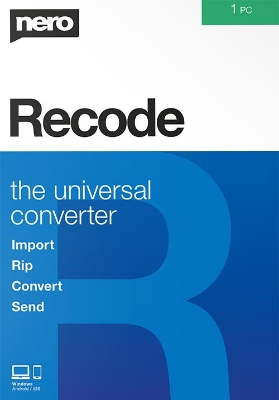
Nero Recode ‐ The universal converter!
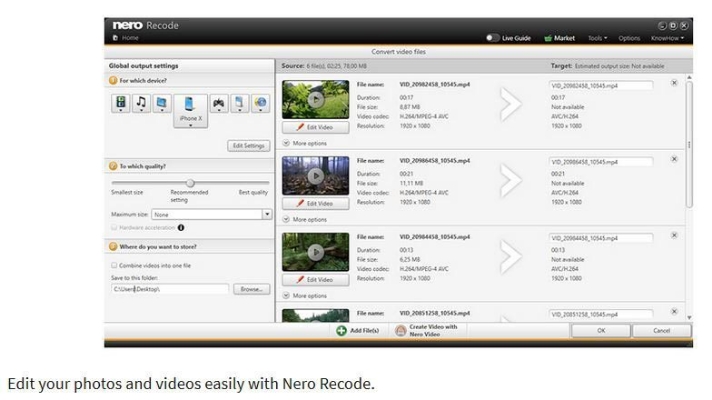
Convert and rip videos and music to all standard formats for your mobile devices at a breathtakingly quick rate. In addition, you can rotate, trim and crop videos with a single click.
New in Nero Recode
Annoyed by your PC sending you error messages because it can’t read the file you want to play? Nero Recode is the solution! Whether video or audio files, whether for import or export, whether smartphone recordings, DVD‐Video™ or Blu‐ray Disc™: the ripping and converting specialist converts everything to the right format for your devices.
Key features
- Import
- A well‐functioning team:
It’s easy to import films from your disc* or copy your videos and music right to the start screen of Nero Recode. And you can sit back and relax during the process, as Nero Recode achieves fantastic results when importing any file from Blu‐ray Discs™, AVCHDs, DVD videos™, or from video and audio files. - Rip
- Break down barriers:
Tiresome reformatting to play movies or music on any device? Forget it! With the 1‐click conversion from Nero Disc to Device to Nero Recode, you can easily rip DVDs*, AVCHDs*, Bluray Discs™* and audio CDs to fit any of your devices: connect device, select songs, transfer, done! And for even more convenience, Gracenote® technology lets you play your music on your mobile device and sort it, even by album cover. Converting Blu‐ray 3D™ discs to 2D, HD, and SD formats is also supported. - Convert
- Freedom for formats:
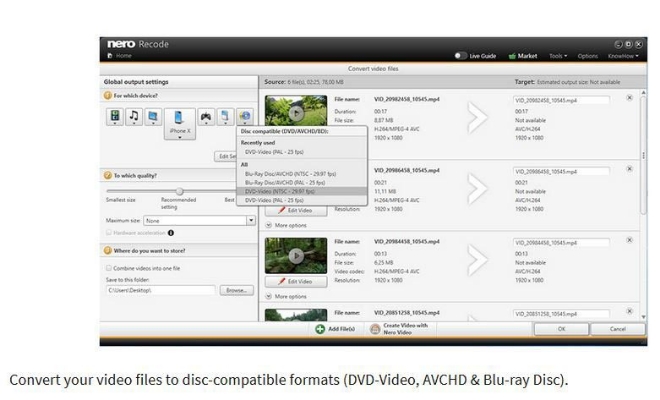
Want to easily transfer and play your video and audio files from your PC to your tablet or smartphone? Whether mobile device, PlayStation®, Xbox® or MP3 player, Nero Recode always finds the right format thanks to the latest device support. You can now also convert your video files specifically for use in video discs (DVD‐Video™, AVCHD, Blu‐ray Disc™). When importing into your video and video disk projects, they increase performance and no longer need to convert to the appropriate format for burning. Easily create job lists for your scheduled conversions and run large conversion jobs overnight with the Turn off PC after completion option. - Edit
- Editing your clips with just one click:
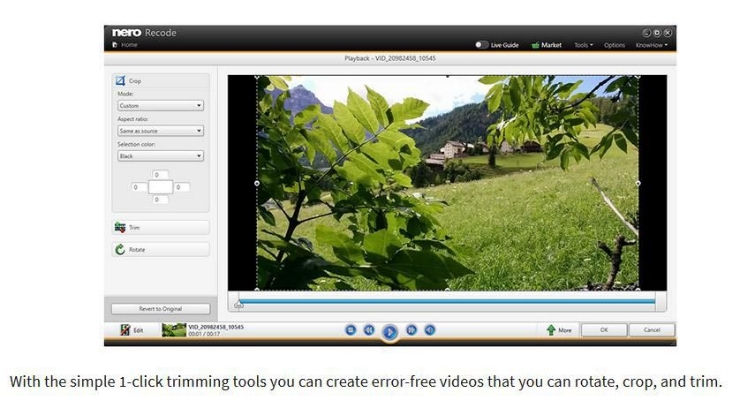
Have an upside‐down video after holding your phone the wrong way when recording? Nero Recode has simple 1‐click trimming tools to correct video orientation, and to rotate, crop, and cut videos in any way you like. And by the way: with the free WiFi+Transfer App, you can also easily transfer your converted media archive and album cover to your portable devices.
*Only for non‐copy‐protected media.
system requirements
Windows - Minimum
- OS: Windows® 7 SP1 Home Premium, Professional or Ultimate (32/64 bit), Windows® 8 (32/64 bit), Windows® 8.1 (32/64 bit) with April 2014 update (32/64 bit), Windows® 10 (32/64 bit)
- Processor: 2 GHz AMD or Intel® processor
- RAM: 1 GB RAM
- For SD Video Conversion: 2 GHz AMD or Intel® processor, 1 GB RAM
- For HD Video Conversion: Intel® Core™ II Duo 2.2 GHz processor, AMD Athlon 64 X2 5200+ 2.6GHz or above, 2 GB RAM
- For Ultra HD (4k) Video Conversion: Intel® Core™ i7-2600K (3,4 GHz) or above, AMD FX 8320 (3,5 GHz) or above, 4 GB RAM
- HDD: 150 MB hard drive space for a typical installation of all components
- Microsoft DirectX® 9.0 compliant graphics card with 3D acceleration, 16-bit color, and a minimum of 128 MB video memory is required (32-bit, true color, 256 MB dedicated video RAM, and support for Shader Model 3.0 is recommended)
- CD, DVD, or Blu-ray Disc drive for CD/DVD/Blu-ray Disc ripping
- DirectX® 9.0c revision 30 (August 2006)
- Windows Media® Player 9
- Third party components such as Microsoft .NET® 4.5.2, Microsoft® DirectX® or Adobe Flash are shipped with the product or automated downloaded if not included in the package
- For some services an Internet connection is required
- Internet connection may be required to verify the serial number during usage of certain features. Internet connection charges are the user's responsibility
- Nero KnowHow App: Windows ® 10 and higher, Android 4.0 and higher, iOS 8.0 and higher
Note
- On 64-bit operating systems, applications run in 32-bit emulation mode
- The devices must be correctly installed and recognized by the operating system for the product to work properly
- Installation of the latest WHQL certified device drivers is strongly recommended
Windows - Minimum
- OS: Windows® 7 SP1 Home Premium, Professional or Ultimate (32/64 bit), Windows® 8 (32/64 bit), Windows® 8.1 (32/64 bit) with April 2014 update (32/64 bit), Windows® 10 (32/64 bit)
- Processor: 2 GHz AMD or Intel® processor
- RAM: 1 GB RAM
- For SD Video Conversion: 2 GHz AMD or Intel® processor, 1 GB RAM
- For HD Video Conversion: Intel® Core™ II Duo 2.2 GHz processor, AMD Athlon 64 X2 5200+ 2.6GHz or above, 2 GB RAM
- For Ultra HD (4k) Video Conversion: Intel® Core™ i7-2600K (3,4 GHz) or above, AMD FX 8320 (3,5 GHz) or above, 4 GB RAM
- HDD: 150 MB hard drive space for a typical installation of all components
- Microsoft DirectX® 9.0 compliant graphics card with 3D acceleration, 16-bit color, and a minimum of 128 MB video memory is required (32-bit, true color, 256 MB dedicated video RAM, and support for Shader Model 3.0 is recommended)
- CD, DVD, or Blu-ray Disc drive for CD/DVD/Blu-ray Disc ripping
- DirectX® 9.0c revision 30 (August 2006)
- Windows Media® Player 9
- Third party components such as Microsoft .NET® 4.5.2, Microsoft® DirectX® or Adobe Flash are shipped with the product or automated downloaded if not included in the package
- For some services an Internet connection is required
- Internet connection may be required to verify the serial number during usage of certain features. Internet connection charges are the user's responsibility
- Nero KnowHow App: Windows ® 10 and higher, Android 4.0 and higher, iOS 8.0 and higher
Note
- On 64-bit operating systems, applications run in 32-bit emulation mode
- The devices must be correctly installed and recognized by the operating system for the product to work properly
- Installation of the latest WHQL certified device drivers is strongly recommended
Je ontvangt een digitale code, die je direct kunt activeren (Niet van toepassing op pre-orders)
Ontvang uw code snel na betaling (digitaal, geen fysieke levering)
DreamGame is een geautoriseerde wederverkoper
|
DRM:
|
Other DRM
|
|
Platform:
|
PC
|
|
OS:
|
Windows
|
|
Releasedatum:
|
2019-09-30
|
|
Uitgever:
|